AWS - Part 1
Note - Not every resource is present in all the regions
IAM
refers to Identity Access Management.
A bit on Root Account
Root account has the most access. It shouldn’t be used because of the following reasons:
- If compromised, the attacker gains the root access
- Root account can delete anything even though it’s not intended
Policy
Policy is a set of rules in JSON that defines what actions are allowed on what resources. Policies can be inbuilt(from AWS), or you can define your own policies.
Users and Groups
Users on AWS in general have a one-to-one mapping with a physical user. Groups contains users. It does not contain other groups.
You attach policies to users and groups to give them access to resources.
Password Policy and MFA
Admin can enforce password policy(min length, special char should be present and so on) and MFA for all the users to enhance security.
IAM Roles for Services
When you want the EC2 machine that you provisioned to have access to S3, how do you achieve that? Never ever add your user credentials to the EC2 machine. Other users who has access to EC2 will be able to pull the credentials. Use “IAM service role”, it’s like creating a user for that machine. Attach appropriate policies to that service role to give access to S3.
Credentials Report and Access Reports
Creds Report - A downloadable report that lists all IAM users in an AWS account and the status of their credentials (passwords, access keys, MFA, etc). Access Report - A report that shows which AWS services an IAM user, group, or role has accessed.
EC2
EC2 refers to Elastic Compute Cloud. AWS provides compute that can be used to run workloads.
EC2 Instance Types
General Purpose - T and M series - For general purpose workloads Compute Optimized - C series - Batch Processing, Media Transcoding, Game Servers Memory Optimized - R series - Cache Stores, In-memory dbs Storage Optimized - I series - Databases, or anything that require high I/O
Security Groups
Security Groups are traffic rules that you can define on services present inside VPC. It can be used to control inbound and outbound traffic on the following variables:
- Access to ports
- Protocol
- IPs
Security Groups are stateful, if the traffic has passed the SG check from one side, it will come back as well.
Purchasing Options - EC2
- On-Demand - Pay by Usage
- Reserved - Reserve the instance for a year or 3. Cheaper than on-demand.
- Savings - Instead of reserving a Instance type, you guarantee to spend $k/hr for a year or 3. All the computes are available at discounted rates. You pay 1yr X 365 X 24 X “5” for compute. If you go above, you pay additional charges but if go below the promised spend, you don’t get any refunds.
- Dedicated - If you want to rent entire physical machine
- Capacity Reservation - Guarantees instance availability in a specific AZ, but does not provide any cost discount.
- Spot - Provides heavy discount on instances but doesn’t guarantee availability
A bit on Spot Instances
Request Types:
- One-time - If the spot goes down, AWS won’t spawn the spot again.
- Persistent - Opposite of one-time.
Buying Options:
- On Demand - The current price of the spot
- Max Price - Max price you are willing to pay for the spot. If the on-demand price of spot goes above that, spot will be terminated for you.
Strategies:
- Lowest Price - Just pick the lowest price machines
- Diversified - Pick from multiple instance types
- Capacity Optimized - Pool with most instances
- Price-Capacity Optimized - Balance bw capacity and price
NAT Gateway vs Internet Gateway
A NAT Gateway allows outbound internet access for private subnets and blocks unsolicited inbound traffic. An Internet Gateway is attached to a VPC and enables bidirectional internet connectivity for resources in public subnets, provided they have public IPs and appropriate routing and security rules.
Elastic IP
An elastic IP is a public IPv4 you own or buy seperately. You can attach it to instances.
Placement Groups
This defines how machines are placed in AWS. The strategies can be following:
Cluster
All machines are in the same AZ. Single point of failure but machines can communicate with each other with very less latency.
Spread
Machines are spread over multiple AZs and regions to avoid single point of failure but this increases latency.
Partition
Provides a balance bw cluster and spread. A partition can contain multiple machines. So, you deploy multiple partitions. The application is spread in such a way that if one partition goes down, the others can handle it.
Elastic Network Interface - ENI
Logical component in VPC that represents a Virtual Network Interface Card (VNIC). It has a public IP, a mac address, one or more SGs, one or more private IPv4s.
Q. Why is an ENI needed in the first place? Instances already have IP addresses. A. An ENI is needed because it acts as a detachable virtual network interface that owns the IP address and security settings, giving EC2 instances flexible, portable network identity and control. An EC2 instance can have more than one ENI.
EC2 Hibernate
EC2 Hibernate is a feature that lets you pause an EC2 instance and later resume it with its RAM state preserved. The RAM state is written in root EBS volume.
EBS Volume(Elastic Block Storage)
An EBS volume is a “network drive” that you attach to an EC2 instance. It provides persistent block storage for your EC2 instances.
EBS Volume Types
- gp2/gp3 - General Purpose
- io1/io2 - higest performance SSD volumes. This is the only type that can be attached to multiple EBS volumes at a time, given that the file system being used is cluster aware.
- sc1 - low cost HDDs
EBS Snapshot
An EBS snapshot is a point-in-time backup of an EBS volume stored in S3(internally) for recovery or replication.
EC2 Instance Store
Physically attached storage attached to EC2 instance. Provides better performance at the cost of data loss(if instance is stopped), data is ephemeral.
EBS Encryption
Feature that allows data inside the volume to be encrypted using KMS(AES-256).
AMI(Amazon Machine Image)
Build your own custom OS using EC2 instances. Add software, configurations, boot up applications and package it as an AMI. It can then be used to launch new EC2 instances.
Golden AMI
A Golden AMI is a standardized AMI built once by a central team, with all updates and security fixes already baked in, so every team launches from the same trusted base.
Q. How to instantiate applications quickly? A. Golden AMIs – Pre-bake your app into an AMI so instances boot ready to go. Elastic Beanstalk – Upload code, AWS handles the rest. AWS App Runner – Point at your container or repo and it runs immediately. Lambda – Deploy code in seconds, no servers at all. CloudFormation/CDK – Reuse templates to spin up full stacks rapidly.
IOPS vs Throughput
- IOPS - Input/Output Operations Per Second
- Throughput - Amount of data that can be transferred in a given time, say bits per second.
Amazon EFS
Distributed managed NFS(Network File System) that can be mounted on many EC2. It uses NFSv4.1 protocol. The data can be encrypted using KMS.
EBS, EFS and Instance Store are three different ways to store data on AWS. Each having different performance characteristics and use cases.
Scalability & Availability
Availability = uptime/(uptime + downtime) Scalability = On increasing the load, after what time does the system become unresponsive or slow. The higher the time, the more scalable is a system.
ELB(Elastic Load Balancer)
An ELB is a managed load balancer. It’s cheap to use and has good integration with other AWS services. Health checks is one of the feature that it offers. Type of LBs - Application Load Balancer(ALB), Network Load Balancer(NLB), Gateway Load Balancer(CLB)
Application Load Balancer(ALB)
ALB is a layer 7 load balancer. It can route traffic based on HTTP headers, path, query parameters etc. It can also be used for SSL termination.
Network Load Balancer(NLB)
NLB is a layer 4 load balancer. It can route traffic based on IP address, port number and protocol. It’s more efficient than ALB as it doesn’t do any protocol parsing.
Gateway Load Balancer(GLB)
A Gateway Load Balancer (GWLB) is a load balancer that distributes network traffic to third-party virtual appliances (like firewalls or IDS/IPS) for inspection and scaling. Operates at layer 3.
Note - Layer 3 routes packets using only IP addresses, while Layer 4 routes traffic using IP address plus port and protocol (TCP/UDP); an NLB operates at Layer 4 by forwarding based on transport-level information without inspecting application data, whereas an ALB operates at Layer 7 and inspects HTTP/HTTPS details like headers and paths for routing decisions.
Sticky Sessions & Cookies
Say, there is a LB and behind LB there are bunch of EC2 machines. It is a e-commerce wesite. Say, we store cart item in disk space, if the user comes again, we should make sure the user is routed to the same EC2 machine. For this, we can use sticky sessions. Problem - Some EC2 instances are heavier than other. There is uneven distribution of traffic between instances. In case of cookies, we store the data in user’s browser in cookies, user passes the cookie, we decode it and use it to see what he has added to the cart. Problem - The payload size might become heavy.
Cross Zone Load Balancing
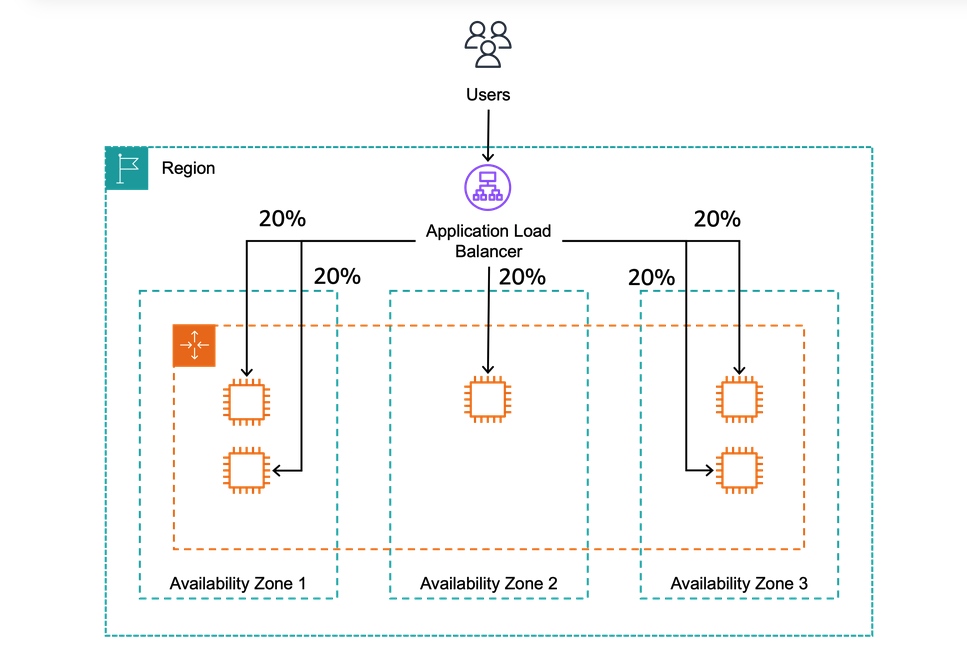
With CZLB, you split the traffic evenly between AZs. This is useful when you have a large number of users and want to distribute the load evenly across multiple AZs. It also helps to improve the availability of your application by providing redundancy in case one AZ goes down.
ASG(Auto Scaling Group)
Helps to scale up and down system based on certain rules. You can set up min, desired and max number of machines. Scaling triggers are as following:
- AWS Cloud Watch Alarm
- Target Tracking Scaling Policies - Average CPU of target group should be below 40%
- Simple/Step Scaling Policies - Increase the number of instances by 2 if CPU Load increases to 30%.
- Scheduled Scaling Policies - Increase the number of instances by 2 at 8 AM and decrease by 2 at 6 PM.
Note about Scaling Cooldown - After scaling activity, cooldown period of 300s is applied, no new instances are dropped or launched, so that the metrics can stabilize.
Amazon RDS(Relational Database Service)
Managed Relational Database Service (RDS) is a managed service that makes it easy to “set up”, “operate”, and “scale” a relational database in the cloud. RDS is available in multiple database engines, including MySQL and PostgreSQL. Features:
- Automated Provisioning, OS Patching
- Monitoring Dashboards
- Continuous Backups and restore it to specific timestamp
- Multi AZ-Setup
- Scaling Capability tldr; provides a lot of functionalities through UI which otherwise would have to be setup manually.
Read Replicas
- Cross Region Possible.
- Replication is async(eventually consistent)
- Replicas can be promoted
RDS Multi AZ(Disaster Recovery)
Allows to set up a ‘stand by’ db in some other region. Both DBs are behind DNS, if the main DB fails, the standby DB gets promoted to main DB.
RDS Custom
Allows to configure internal settings. User has full access to underlying OS & DB unlike normal RDS.
Amazon Aurora
- Postgres and MySQL are both supported in Aurora
- Proprietary tech from AWS
- Claims better performance than RDS but costs 20% more than RDS as well
Features
- Automatic Failover
- Backup & Recovery
- Isolation & Recovery
- Multi-AZ availability
- Restore data to any point in time
RDS Backups vs Aurora Backups
Both provides automated backups. Restore data to any point in time.
Restore a RDS/Aurora backup or a snapshot to create a new DB.
Aurora database cloning
- Faster than snapshot and restore
- Uses copy on write protocol
RDS and Aurora Security
- Database master and replicas encryption using AWS KMS. Optional.
- Security Groups
- IAM
- Audit Logs can be enabled to see the logs
AWS RDS Proxy
Q. What is connection Pooling? A. Connection pooling is a technique used to improve application performance by maintaining and reusing a fixed set of pre-established connections (commonly database connections) instead of creating and closing a new connection for every request, which is expensive due to network handshakes, authentication, and resource setup. The application creates the pool (usually at startup) with a configured minimum and maximum number of connections, and when a request needs to access the database, it borrows a connection from the pool and returns it after finishing its work; when we say a “connection becomes free,” we mean that the request using it has completed and returned it to the pool, making it available for reuse. If the number of concurrent users exceeds the number of available connections, no new pool is created; instead, additional requests wait in a queue until a connection is released back into the pool, and they proceed once one becomes available. Some pools can grow dynamically up to a defined maximum limit, but beyond that limit, requests continue waiting and may eventually fail with a timeout error if a connection does not become available in time, helping protect the database from being overwhelmed while ensuring controlled resource usage and better scalability. Connection Pooling is usually handled by the application or the database driver.
AWS RDS Proxy reduces stress on main DB. Allows apps to pool and share DB connections. Improves CPU, RAM and minimizes open connections on main db. IAM DB Authentication enables login via identity(oauth etc.) instead of normal username and password.
Elastic Cache
Managed redis and memcache service provided by AWS. Redis is more diverse, battle tested, single-threaded and covers many use cases. On the other hand, memcache is simple, multithreaded and provides more raw speed. Always go with redis unless you have a very specific use case in mind. Introducing elastic cache means you have make changes in your application code as well.