Understanding Docker
Contents
- Motivation
- Namespaces and Cgroups
- Container Runtime
- Container vs VM
- Docker
- Docker Networking
- OverlayFS(and Docker)
- Image Layering and caching
- Persisting data with docker
- Multistage Builds
- Docker Swarm and Docker Compose
- Cheatsheet
- Interview Qs
Motivation
tldr; It solves the problem of ‘it works on my system’
Before docker, in order to setup a dev environment, a dev had to go through a lot of hassle - google the error, find answers in blogs, stackoverflow and run it. Two different devs who tried to setup the same environment might have different results due to various reasons like different OS versions, package managers, etc. Docker came up and said, I don’t care what is the underlying dependencies, I will give you sort of an isolated system where you can replicate the same environment w/o any conflicts.
Namespaces, Cgroups and chroot
All of the above are features of linux.
From arch wiki:
A chroot is an operation that changes the apparent root directory for the current running process and their children. A program that is run in such a modified environment cannot access files and commands outside that environmental directory tree. This modified environment is called a chroot jail.
E.g.- Let’s say you opened vim by running vim in terminal, linux went through the PATH and found it in /usr/bin/vim. Now, you went ahead and made
some /dir the new root using chroot. When you try to open vim now, it’s possible that this time the program will not be able to find the vim binary
because it is not in the new root directory.
In Linux, a namespace is a feature that provides isolation of system resources between groups of processes. It makes one set of processes see a different “view” of certain system resources than other processes. They allow - Process isolation, Network isolation, Filesystem isolation, User isolation. Isolation means that processes inside a container are separated from other containers and from the host system — so they cannot see or interfere with each other directly. Process (PID) isolation: A container can only see and manage its own processes. Filesystem (Mount) isolation: A container has its own separate root filesystem view. Network isolation: A container has its own network stack (IP, ports, routing table). User isolation: User and group IDs inside a container are isolated or mapped separately from the host.
cgroups are a Linux kernel feature that allow you to put limits on resource usage (CPU, memory, disk I/O, network, etc.) on processes.
Container Runtime
Container Runtime is a software who is responsible for managing the lifecycle of a container ie. starting, stopping, restarting a container. Eg.- Containerd, CRI-O, runc. Docker uses containerd as container runtime by default.
Container vs VM
Container is a collection of processes running in isolation on an OS. VM can run multiple OS in a machine. So you can run multiple containers on multiple VM’s. Container’s are a higher layer abstraction than VM’s. In real world we use the power of both. We buy VMs from cloud providers and run containers on them.
Docker
Docker CLI/UI -> Docker Engine (dockerd) -> containerd -> runc -> Linux kernel (namespaces, cgroups)
Docker is a platform that helps in the management of containers. It’s a higher level abstraction than container runtime. As you can see that docker cli and docker engine(dockerd) is an additional layer provided by docker.
Dockerfile is a file that contains instructions to build a docker image.
Docker image is a collection of files which contains all the dependencies required to run an application. From docker - “A container image is a standardized package that includes all of the files, binaries, libraries, and configurations to run a container”
Docker Networking
- https://www.youtube.com/watch?v=j_UUnlVC2Ss(Also, check what is a switch device)
- https://docs.docker.com/engine/network/(Just focus on bridge, host and none)
OverlayFS(Image Layering)
https://www.youtube.com/watch?v=R5UzWd833bg
Q: If Docker uses OverlayFS (union FS), why can’t it just rebuild the changed layer and reuse the rest?
A: Because each Docker layer is a diff computed against its exact parent layer; if a parent changes, the filesystem state changes, so all subsequent layer diffs become invalid and must be rebuilt — union FS only merges layers at runtime, it doesn’t make them independent during build.
Persisting data with docker
Docker offers the following options for persisting data:
- Bind mounts: Mount local path to container path
- Volumes: Docker feature, manages storage for user, abstracts away path
- tmpfs: data is stored in memory
Multi-stage builds
Multi stage builds can heavily decrease the size of the final image size. The idea is that you throw out the dependencies that were only needed to build the image. For e.g.- In case of go, you just need the final binary in order to serve the applications, you can throw out other dependencies but those dependencies were needed to create the binary image.
Docker Swarm and Docker Compose
Docker compose is used to connect multiple containers running locally using a single configuration file on a single node. Docker Swarm is used in production to manage multiple containers running on multiple machines.
Docker cheatsheet
Build and images
- Build an image:
docker build -t myapp:1.0 . - List images:
docker images - Remove image:
docker rmi myapp:1.0 - Image history:
docker history myapp:1.0
Containers
- Run a container:
docker run --name web -p 8080:80 myapp:1.0 - Run interactive shell:
docker run -it --rm ubuntu:24.04 bash - List running containers:
docker ps - List all containers:
docker ps -a - Stop/kill:
docker stop web/docker kill web - Remove container:
docker rm web - Logs:
docker logs -f web - Exec into container:
docker exec -it web sh
Networking
- List networks:
docker network ls - Create network:
docker network create app-net - Run on network:
docker run --network app-net --name api myapp:1.0 - Connect/disconnect:
docker network connect app-net web - Inspect:
docker network inspect app-net
Storage
- List volumes:
docker volume ls - Create volume:
docker volume create app-data - Use volume:
docker run -v app-data:/var/lib/app myapp:1.0 - Bind mount:
docker run -v $(pwd):/app myapp:1.0
System cleanup
- Remove stopped containers:
docker container prune - Remove unused images:
docker image prune -a - Remove unused volumes:
docker volume prune - Full cleanup:
docker system prune -a
Compose (local)
- Start:
docker compose up -d - Stop:
docker compose down - Logs:
docker compose logs -f
Interview Questions
- Docker default networking
-> By default, Docker uses the bridge driver on a single host. Containers get a private IP on a virtual bridge, and outbound traffic is NATed. The default bridge is legacy and lacks built-in DNS by container name, which is why user-defined bridges are preferred for real apps.
- How to reduce container image size?
-> Use multi-stage builds, copy only the runtime artifacts, and start from minimal base images (distroless or scratch when possible). Combine RUN steps, remove build caches, and avoid adding tools you don’t need at runtime.
- What’s the difference between CMD and ENTRYPOINT in a Dockerfile?
-> ENTRYPOINT sets the fixed executable for the container. CMD provides default arguments or a default command that can be overridden at runtime. When both are set, CMD usually supplies arguments to ENTRYPOINT.
- What does
docker --initdo?
-> docker init sets up Docker files in your project repo. It scans your app and then generates starter files like a Dockerfile, docker-compose.yml, and .dockerignore. The goal is to help you quickly containerize an existing project without writing everything from scratch. It doesn’t run containers — it just prepares the repo to use Docker easily.
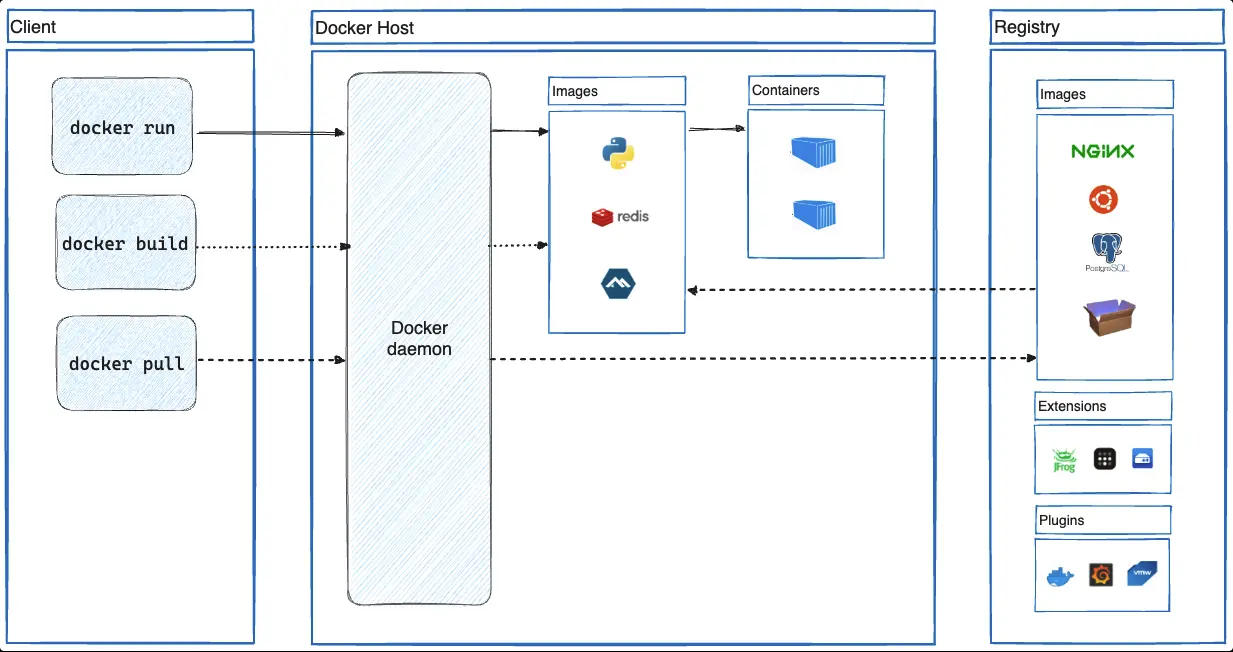
- Explain docker architecture.
-> Docker uses a client–server architecture. The Docker Client (CLI) sends commands like build and run to the Docker Daemon. The Docker Daemon builds images, runs containers, and manages networks & volumes. Docker Images are read-only templates used to create containers. Containers are lightweight, isolated runtime instances sharing the host OS kernel.
- What is docker swarm
-> Docker Swarm is a way to run and manage Docker containers on multiple machines together as one system. Instead of manually starting containers on each machine, you tell Swarm what you want to run and how many copies you need. Swarm then spreads the containers across machines, keeps them running, and shifts them if a machine fails. This makes running apps at scale easier and more reliable.
- Explain docker compose
-> Docker Compose is a tool used to run multiple containers together on a single machine using one configuration file. You describe your app’s services, networks, and volumes in a simple YAML file, and then start everything with a single command. It’s mainly used for local development and testing because it’s easy to set up and understand. Compose makes sure all containers start in the right order and can talk to each other.
- Explain lifecycle of docker
-> The Docker lifecycle starts with building an image from a Dockerfile, which defines how the app and its dependencies are packaged. That image is stored locally or pushed to a registry like Docker Hub. Next, the image is used to create and run a container, which is the live, running instance of the app. The container can be started, stopped, restarted, or scaled, and Docker monitors it while running. Finally, containers and images can be stopped, removed, or updated when no longer needed.
- How to delete an image from local
-> docker image rm
- Can a container restart itself?
-> Yes, a container can restart itself if it crashes or stops unexpectedly. This is controlled by the restart policy set when the container is created. The default policy is “no”, which means the container will not restart automatically. Other policies include “always”, “on-failure”, and “unless-stopped”.
- What are dangling images?
-> Dangling images are images that have no tag or name associated with them. They are created when you build an image without specifying a tag or name, or when you build an image with a tag that already exists. Dangling images can take up space on your system and should be cleaned up periodically.
- Pruning stuff
-> docker image prune -> docker network prune -> docker volume prune -> docker container prune -> docker system prune -> combines all above
- COPY vs ADD. Which one to use?
-> COPY just supports copying local files. ADD supports copying local files, remote files, and archives. Docker’s official documentation recommends using COPY for most cases. Reserve ADD only for scenarios where you specifically need its unique, automatic tar extraction capability for a local file.
- How to inspect an image?
-> docker image inspect
- How to make build size smaller?
-> 1. Use multi-stage builds to reduce the size of your final image.
- Use a base image that is as small as possible.
- Remove unnecessary files and dependencies.
- Use a smaller version of the programming language or framework.
- Use a smaller version of the operating system.
-
Use distroless images.
- How to create custom network? What network driver is used by default?
-> docker network create –driver bridge my_network. Bridge network is used by default.
- You’re working on a critical application running in Docker containers, and an update needs to be applied without risking data loss. How do you update a docker container w/o losing data?
-> Will take the backup of the data before updating the container. We will try to create similar setup in some env.
- How to detach and reattach a container?
-> docker stop my_container
docker rm my_container
docker run -d –name my_container
-v my_volume:/app/data my_image
- How do you secure docker containers?
-> Use minimal base images (alpine/distroless) Scan images for vulnerabilities (Trivy, Grype) Pin image versions, never use latest Run containers as non-root users Sign and verify images (Docker Content Trust / Cosign)
- Best practices for managing Docker images and containers
-> Use small, trusted base images and multi-stage builds Tag and version images clearly; avoid latest Clean up unused images, containers, and volumes regularly Run containers with least privilege (non-root, limited resources) Monitor, scan, and log containers in production
- How do you remove a running container?
-> docker stop my_container docker rm my_container
- Various states of docker container at any given point in time?
-> running, paused, restarting, exited
- Docker volume vs Bind mounts
-> Docker volumes are managed by Docker and are isolated from the host filesystem, while bind mounts are directly mapped to the host filesystem. Docker volumes are more secure and easier to manage, but bind mounts are more flexible and can be used to share data between containers. Isolation means Docker controls where and how the data is stored, and containers can access it only through the mounted volume—not the host filesystem directly.
- Talk a bit about namespaces.
-> namespaces is a linux feature which ensures that a process is never able to see the host. It has it’s own networking, processes, hosts among other things.
- Explain chroot
->